The profiles
- Spotify (default): loudness (-18 LUFS) and MP3 192 kbps settings for Spotify.
- Google Play Books: MP3 192 kbps settings, voice only with no sound layer.
- Kobo Writing Life: MP3 192 kbps settings, voice only with no sound layer.
- Apple Podcasts: loudness (-16 LUFS, -1 dBTP) and MP3 128 kbps settings.
- Voices by INaudio: retail spec (-20 LUFS, -23 to -18 dB RMS, -3 dBTP, -60 dB noise floor, 120 min chapter cap), voice only.
- Author's Republic: retail spec (-20 LUFS, -23 to -18 dB RMS, -3 dBTP, -60 dB noise floor, 1 to 5 s silence, 79 min max per file), voice only.
- Strict reference: the strictest internal spec (-20 LUFS, -23 to -18 dB RMS, -60 dB noise floor, strictly under 120 min), voice only.
Ready-to-publish report
The Downloads tab checks your finished audio against the chosen profile. For profiles that share your default master audio (Spotify, Google Play Books and Kobo Writing Life), it reads stored chapter measurements without re-decoding.
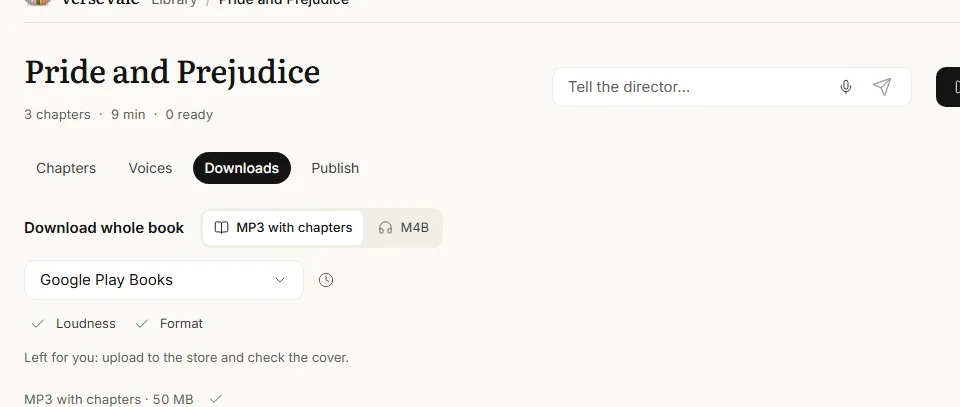
Choose a profile
Pick the profile when you export.
Read the checklist
Each line is ready, or it names what does not match.
Export
The file is made with the chosen profile.